Read your network
like a patch bay.
Patefact opens exported preset files and shows you in a clear matrix what signal goes where. Entirely offline, on Mac and iPad. Compatible with the Dante® preset format.
A preset is a text file. Not a picture.
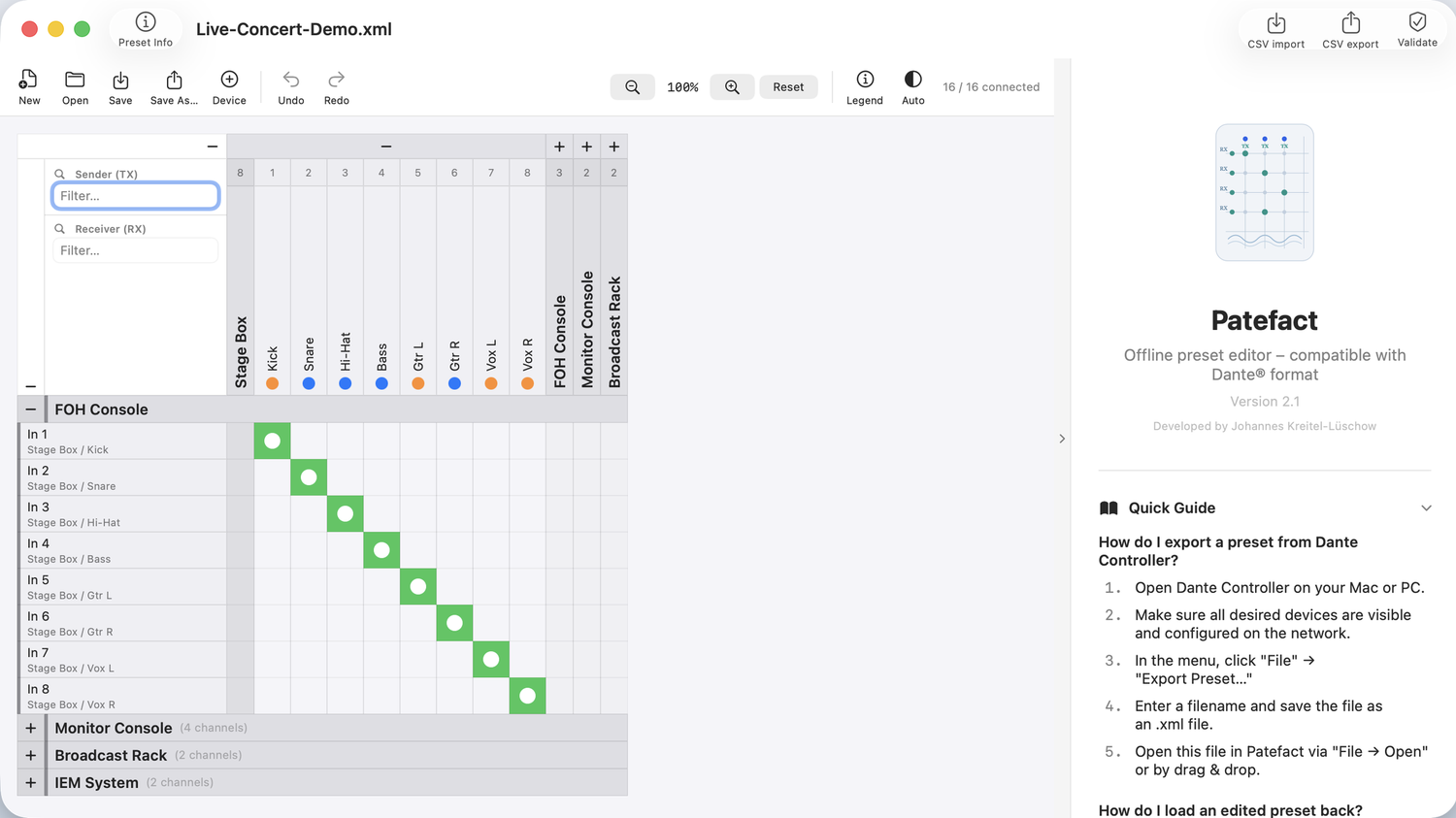
Understanding an existing setup normally means having the whole rig on the network. Otherwise all you have is an XML file a few hundred lines long. Patefact turns it back into a picture: every device, every channel and every single connection, even when not a single device is within reach.
Senders on top, receivers on the left, connections between them
That is exactly how it looks in the app too. Every dot is a subscription: a channel running from one device to another. If a connection is missing, you see the gap immediately instead of chasing it during soundcheck.
Filters for senders and receivers, zoom for large networks, and a count of how many of the expected connections actually exist.
Four situations where it makes the difference
Reviewing an existing preset
You take over an installation someone else configured. Open the preset, look at the matrix, done. Device details show sample rate, latency, network and clock settings for every single device, without a single one of them needing to be switched on.
Planning before the hardware arrives
Add devices, name channels and build the routing weeks before load-in. On show day you load a finished preset instead of clicking through it on site.
Catching mistakes before they go live
The built-in check reports connections to transmit channels that do not exist, receive channels already taken twice and sample rates that do not match. It also warns about mismatched clock domains, empty channel names and devices that were captured offline. Better at your desk than two minutes before an audience.
Recurring setups
Touring, rental, fixed installation: recurring devices go into your own library, and you rename channels in batches instead of one at a time. What used to take an evening is now a routine.
What is inside
Routing matrix
Every sender, receiver and connection at a glance. Filter, zoom, collapsible devices.
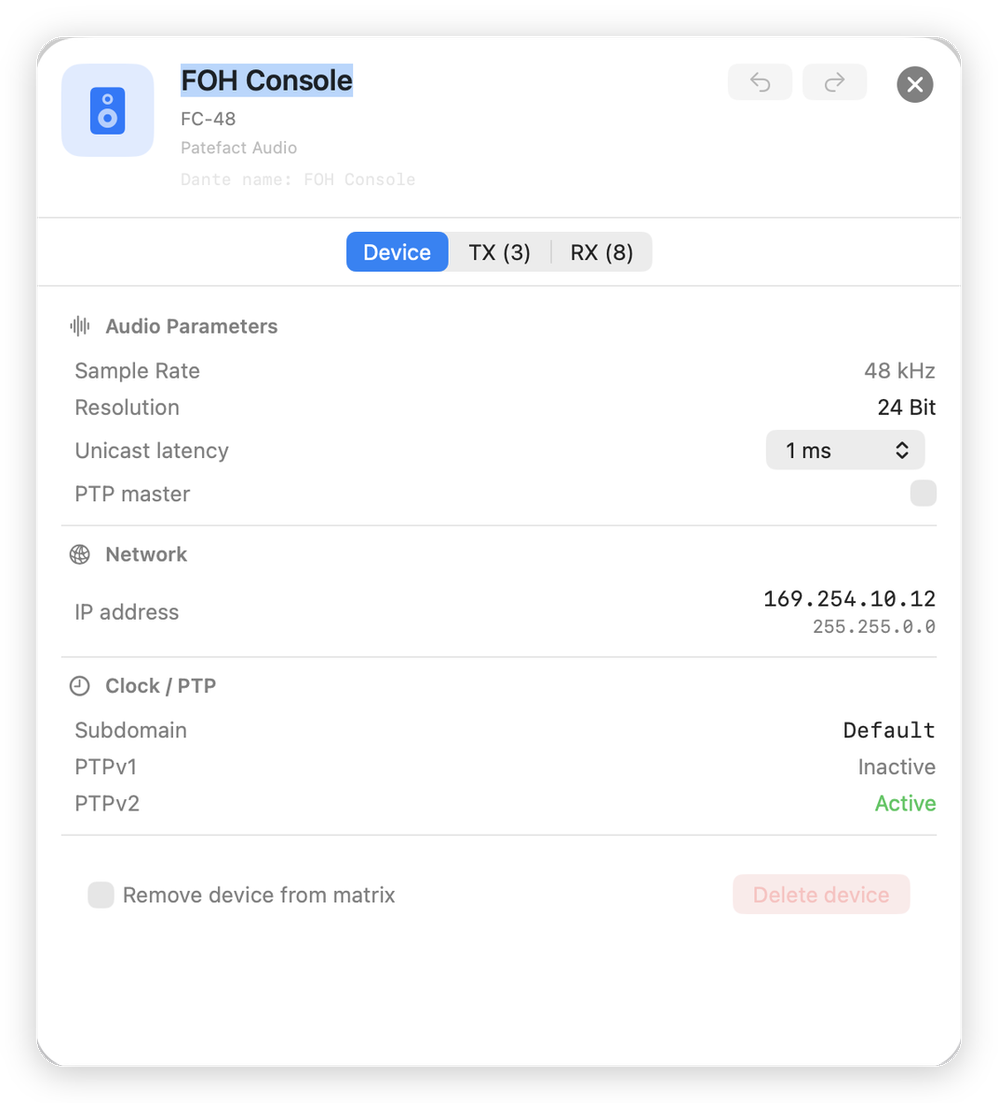
Device details
Sample rate, bit depth, unicast latency, IP address, clock and PTP status for every device.
Validation
Six rules against sample rates, clock domains, missing transmit channels and doubly-assigned inputs, before the preset goes to the hardware.
Renaming channels
Rename transmit and receive channels in the device view. Existing connections follow automatically.
CSV import and export
Bring in device lists and hand out routing plans, for documentation and handover.
Mac and iPad
Native apps for both systems. One purchase covers both platforms.
Completely offline
No account, no server, no data transfer. Your presets stay on your device.
Eight languages
English, German, French, Spanish, Italian, Japanese, Polish, Portuguese.
Light and dark
Follows the system or can be fixed, even for dark control rooms.
Travelling light
The iPad version is not a stripped-down companion, it is the same app: matrix, device details, validation. For the moment the laptop is in its case and you still need to know where channel 12 goes.

From the console to Patefact and back
Patefact never transfers anything to hardware itself. That stays the job of your control software. In between sits the file, and that is what Patefact works with.
Export the preset
Save the preset as an XML file in your control software while the devices are still on the network.
Open it in Patefact
Load the file by double-clicking or dragging it in. From here you no longer need a network: review, plan, change.
Load it back
Load the saved file back into your control software. It shows a preview, you confirm. Done.
Always test a modified preset in a non-live environment first. Loading a faulty preset can interrupt existing audio connections.
Start small, upgrade when you need to
Patefact is free to use, with no account required. Premium is a one-time purchase, not a subscription, and covers Mac and iPad together.
Lite
For small setups and reviewing other people's presets.
- Full routing matrix and device details
- Validation, channel renaming, CSV import and export
- Up to 5 devices and 20 routes per preset
- Unlimited presets
Premium
One-time purchase. For larger systems and recurring work.
- Unlimited devices and routes per preset
- Personal device library for recurring hardware
- Batch renaming of whole channel groups
- Covers Mac and iPad together
Quick answers
Can I transfer presets directly to the hardware?
No. Patefact creates and edits configuration files offline. Transfer to the hardware happens exclusively through the manufacturer's official control software.
Which file formats are supported?
The app reads and writes XML files in the Dante Controller 3.x preset format. Older or newer versions may differ; unknown versions are flagged when opened.
What does "device captured offline" mean?
Some devices were not fully captured during export because they were unreachable at that moment. Their channels are visible, but network and firmware data is missing.
Are my presets stored in the cloud?
No. Patefact works entirely offline. All data stays on your device; there is no account and no server.
Can I add devices that do not exist yet?
Yes. You can add devices manually or pull them from your library, to plan setups ahead of time.
Do I need to buy the app twice for Mac and iPad?
No. Premium is purchased once and covers both platforms.
Available now on the App Store
Patefact is here, for macOS and iPadOS. One purchase, both platforms.